SGDK Palette Swapper
SGDK Palette Swapper is a local web app for editing indexed PNG palettes, snapping colours to Sega Mega Drive-safe values and exporting SGDK-ready artwork.
- Role
- Design & Code
- Year
- 2026
- Status
- Launched
- Links
- Site
What it is
SGDK Palette Swapper is a browser-based utility for working with Sega Mega Drive / Genesis background artwork prepared for SGDK.
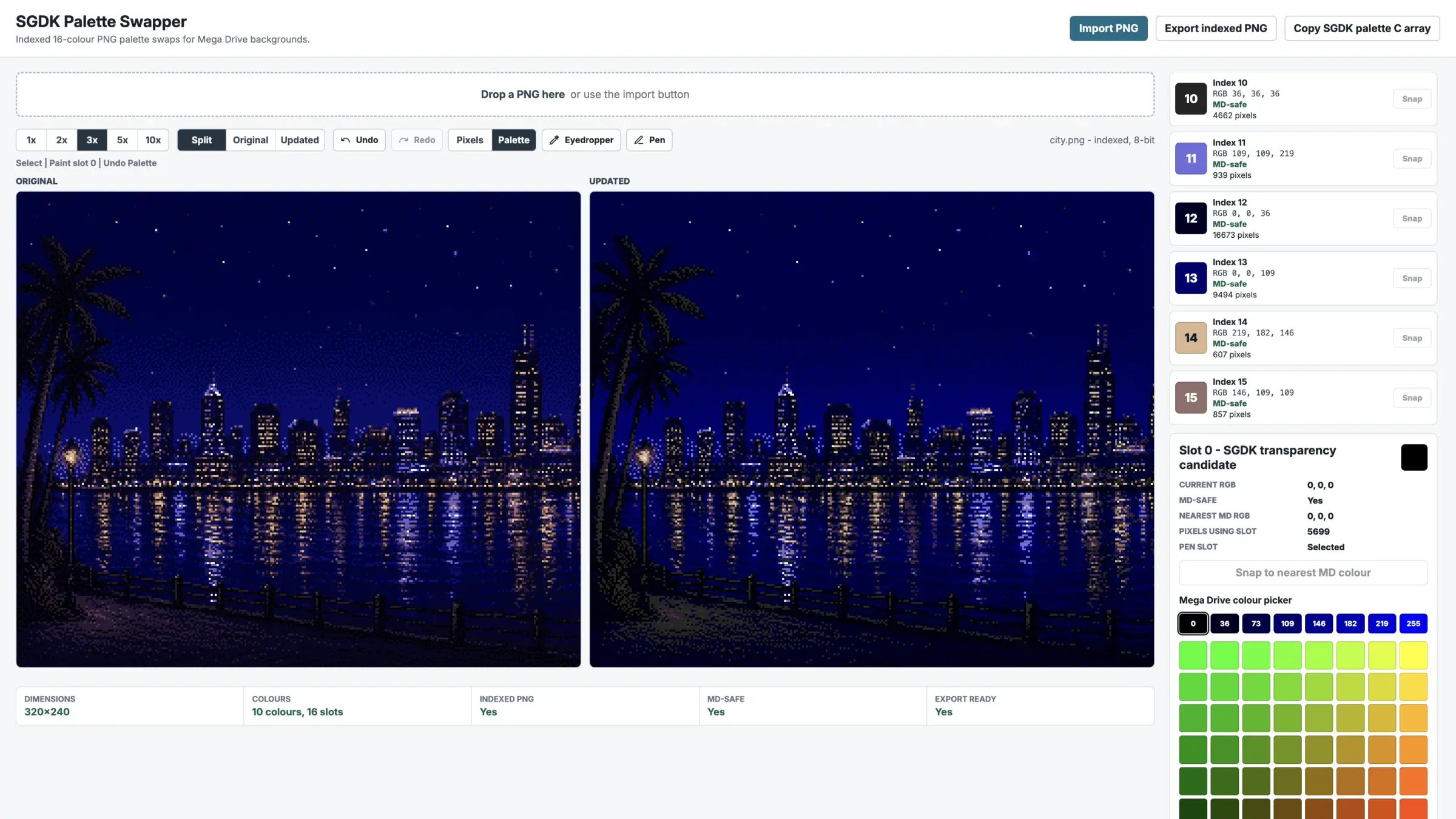
It imports PNG backgrounds, reads the indexed palette where possible, shows the 16 palette slots in order, flags colours that are not Mega Drive-safe, and lets you replace palette entries with valid 3-bit-per-channel Mega Drive values. The image preview updates instantly because the tool is changing palette entries globally rather than repainting pixels in RGBA.
It also supports a small indexed pen workflow for touch-ups. You can pick an existing palette slot and paint one pixel at a time, or use the eyedropper to select the slot already used by a pixel in the image. The point is not to become a full paint package. It is to make palette correction and small indexed fixes practical in one place.
Why
Mega Drive background preparation has a very specific kind of friction. The art is usually small, indexed and heavily constrained, but the tools you reach for are often either too general or too destructive.
A normal image editor will happily let you change colours in ways that break the indexed structure, reorder the palette, introduce extra colours, or export back out as full RGBA without making that especially obvious. For SGDK work, that is exactly the sort of damage you do not want.
I wanted a tool that stayed close to the real asset format. Read the image as indexed data if possible. Preserve the palette order. Preserve the pixel index map. Let me fix unsafe colours quickly, preview the result immediately and export a PNG that is still suitable for SGDK workflows.
The goal was not “make another pixel editor”. It was “make palette-safe correction easy”.
How it came together
The core decision was to treat indexed PNG structure as the real source of truth instead of flattening everything through canvas and pretending that was good enough.
That meant writing the tool around palette entries and pixel indices directly.
For indexed PNGs, it reads the PNG chunks, extracts the palette, inflates the
image data, reverses the PNG scanline filters, and keeps the decoded index
buffer intact. Once that was working, the rest of the product became much
clearer: changing slot 5 means changing palette[5], not repainting thousands
of pixels one by one.
That architecture drove most of the value in the tool. Palette swaps became instant and lossless. Mega Drive-safe snapping became straightforward. Export could reuse the same pixel indices with an updated PLTE chunk instead of relying on browser canvas export, which would normally throw the image back out as RGBA PNG.
The next layer was workflow. A simple status panel made the SGDK constraints visible: dimensions, colour count, indexed PNG status, Mega Drive-safe status and whether the file is export-ready. From there it made sense to add per-slot snapping, global snapping and SGDK palette array export.
Then the tool started to become more practical in real use. Bigger preview zoom levels were added because palette work on a 320-wide background gets fiddly quickly. After that, an eyedropper made sense because the app already knew the exact palette index of every pixel. Clicking a pixel could directly select the slot it uses without any colour matching at all.
That opened the door to a very limited pen tool. Not a freeform RGB brush, and not a general paint mode. Just a 1px indexed pen that writes the currently selected palette slot into the existing index map. That kept the behaviour aligned with the rest of the app: no new colours, no palette drift, no pretending this is a full editor.
As more editing modes were added, the UI also had to tighten up. Preview modes were added so the user can switch between split view, original only, or updated only. That matters more than it sounds, because on a constrained canvas the difference between seeing both images and seeing the one you are actively editing is the difference between “usable” and “annoying”.
What’s next
The main next step is improving the editing model without letting the tool sprawl. Palette history and pixel history still need to feel completely predictable, and there is room to make that clearer. A pixel loupe would also make precise work more comfortable, especially when using the pen or eyedropper at normal zoom.
Longer term, there is room for a few more SGDK-specific helpers, but the line matters. The best version of this tool is still a focused indexed workflow utility, not a giant art package.
It is already useful because it respects the structure of the files it works on. The next improvements should keep reinforcing that rather than diluting it.